





① 第 8 行 — 添加webp格式
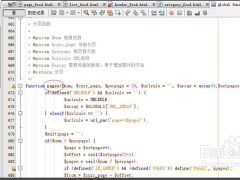
② 第 112–128 行 —`upload()` 内的上传处理块,处理转换webp
- var $imageexts = array('gif', 'jpg', 'jpeg', 'png', 'bmp'); // 原
- var $imageexts = array('gif', 'jpg', 'jpeg', 'png', 'bmp', 'webp'); // 改为
upload方法里边找到上面的代码,在后边添加代码:
- if($watermark_enable) {
- $image->watermark($savefile, $savefile);
- }
③ 第 250 行(`getname()` 方法前) — 新增`to_webp()` 方法:
- // 自动转 WebP(后台开关控制)
- $webp_setting = $this->_get_site_setting($this->siteid);
- $src_ext = $fileext;
- $webp_file = $this->to_webp($savefile, $fileext, $webp_setting);
- if($webp_file) {
- @unlink($savefile);
- $fileext = 'webp';
- $savefile = $webp_file;
- $filepath = preg_replace(new_addslashes("|^".$this->upload_root."|"), "", $webp_file);
- $file['name'] = preg_replace('/\.(jpg|jpeg|png|gif)$/i', '.webp', $file['name']);
- $file['size'] = @filesize($webp_file);
- // 缩略图同步转 webp,保持 get_thumb 命名一致
- if($thumb_enable && !empty($thumb_src) && file_exists($thumb_src)) {
- $thumb_webp = $this->to_webp($thumb_src, $src_ext, $webp_setting);
- if($thumb_webp) @unlink($thumb_src);
- }
- }
- $uploadedfile = array('filename'=>$file['name'], 'filepath'=>$filepath, 'filesize'=>$file['size'], 'fileext'=>$fileext, 'fn'=>$file['fn']);
2. cms/modules/admin/templates/site_edit.tpl.php
- /**
- * 图片转 WebP(需 GD 支持 webp,且后台开关开启)
- */
- function to_webp($file, $fileext, $setting = array()) {
- if(empty($setting['webp_enable']) || !function_exists('imagewebp')) return false;
- $fileext = strtolower($fileext);
- switch($fileext) {
- case 'jpg':
- case 'jpeg':
- $src = @imagecreatefromjpeg($file);
- break;
- case 'png':
- $src = @imagecreatefrompng($file);
- break;
- case 'gif':
- $src = @imagecreatefromgif($file);
- break;
- default:
- return false;
- }
- if(!$src) return false;
- if($fileext == 'png' || $fileext == 'gif') {
- imagepalettetotruecolor($src);
- imagealphablending($src, true);
- imagesavealpha($src, true);
- }
- $quality = intval($setting['webp_quality']) ? intval($setting['webp_quality']) : 85;
- $newfile = preg_replace('/\.('.$fileext.')$/i', '.webp', $file);
- if(imagewebp($src, $newfile, $quality)) {
- imagedestroy($src);
- return $newfile;
- }
- imagedestroy($src);
- return false;
- }
第 176 行(水印开关`</tr>` 之后) 插入:
3. cms/modules/admin/templates/site_add.tpl.php
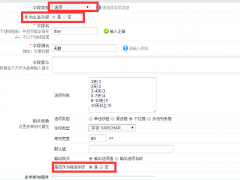
- <tr>
- <th>上传图片转 WebP:</th>
- <td class="y-bg">
- <input class="radio_style" name="setting[webp_enable]" value="1" <?php echo $setting['webp_enable']==1 ? 'checked="checked"' : ''?> type="radio"> 开启
- <input class="radio_style" name="setting[webp_enable]" value="0" <?php echo $setting['webp_enable']!=1 ? 'checked="checked"' : ''?> type="radio"> 关闭
- 质量:<input type="text" class="input-text" name="setting[webp_quality]" id="webp_quality" size="4" value="<?php echo $setting['webp_quality'] ? $setting['webp_quality'] : '85' ?>" />(1-100,需 GD 支持 WebP)
- </td>
- </tr>
第 166 行(水印开关`</tr>` 之后) 插入:
4. statics/js/swfupload/swf2ckeditor.js(这是老版本的上传)
- <tr>
- <th>上传图片转 WebP:</th>
- <td class="y-bg">
- <input class="radio_style" name="setting[webp_enable]" value="1" type="radio"> 开启
- <input class="radio_style" name="setting[webp_enable]" value="0" checked="checked" type="radio"> 关闭
- 质量:<input type="text" class="input-text" name="setting[webp_quality]" id="webp_quality" size="4" value="85" />(1-100,需 GD 支持 WebP)
- </td>
- </tr>
第 73 行 :添加webp格式
5. statics/js/webuploader/h5upload.js
- var opt="jpg|gif|png|bmp|jpeg"; // 原
- var opt="jpg|gif|png|bmp|jpeg|webp"; // 改为
第 54 行 :
6. cms/modules/attachment/attachments.php
- var opt="jpg|gif|png|bmp|jpeg"; // 原
- var opt="jpg|gif|png|bmp|jpeg|webp"; // 改为
第 16 行 :添加webp格式
7. cms/modules/attachment/functions/global.func.php
- $this->imgext = array('jpg','gif','png','bmp','jpeg'); // 原
- $this->imgext = array('jpg','gif','png','bmp','jpeg','webp'); // 改为
第 128 行 (`is_image()` 内):判断是否为图片
8. cms/modules/attachment/templates/attachment_list.tpl.php
- $ext_arr = array('jpg','gif','png','bmp','jpeg','tiff'); // 原
- $ext_arr = array('jpg','gif','png','bmp','jpeg','tiff','webp'); // 改为
第 125 行 (内联`IsImg()` 内):
9. cms/modules/attachment/templates/attachment_dir.tpl.php
- var opt="jpg|gif|png|bmp|jpeg"; // 原
- var opt="jpg|gif|png|bmp|jpeg|webp"; // 改为
第 81 行 (内联`IsImg()` 内):
10.(可选)cms/modules/attachment/functions/global.func.php
- var opt="jpg|gif|png|bmp|jpeg"; // 原
- var opt="jpg|gif|png|bmp|jpeg|webp"; // 改为
第 8 行 (`file_icon()` 内,让 webp 图标不显示成空白):
11、statics\images\ext下复制一份jpg.gif改成webp.gif,这样附件列表可以正常显示图标
- $ext_arr = array('doc','docx','ppt','xls','txt','pdf','mdb','jpg','gif','png','bmp','jpeg','rar','zip','swf','flv'); // 原
- $ext_arr = array('doc','docx','ppt','xls','txt','pdf','mdb','jpg','gif','png','bmp','jpeg','webp','rar','zip','swf','flv'); // 改为
12、处理缩略图生成问题(默认的是不支持webp裁剪缩略图的)
找到:cms/modules/attachment/attachment.php搜索代码:
里边加上‘webp’,同理搜索:
- if (!in_array($fileext, array('jpg', 'gif', 'jpeg', 'png', 'bmp'))) exit();
也是加上webp,然后处理缩略图的裁剪,libs/image.class.php大约268行:
- if (in_array($uploadedfile['fileext'], array('jpg', 'gif', 'jpeg', 'png', 'bmp'))) {
也是补上webp改成:
- function check($image) {
- return extension_loaded('gd') && preg_match("/\.(jpg|jpeg|gif|png)/i", $image, $m) && file_exists($image) && function_exists('imagecreatefrom'.($m[1] == 'jpg' ? 'jpeg' : $m[1]));
- }
- function check($image) {
- return extension_loaded('gd') && preg_match("/\.(jpg|jpeg|gif|png|webp)/i", $image, $m) && file_exists($image) && function_exists('imagecreatefrom'.($m[1] == 'jpg' ? 'jpeg' : $m[1]));
- }
改完保存,并更新缓存,就可以了
另外:存量图片如何转成webp?
目前是采用打开文章编辑,然后直接保存的方式,此时会触发自动转换,修改代码:
1、新增方法 convert_local_webp()
在 attachment.class.php 里,紧接在之前加的`to_webp()` 方法 之后 新增:
2、找到module/content/fields/editor/input.inc.php在return之前加入代码
- /**
- * 将内容中的本站本地图片转为 WebP(编辑保存时触发,幂等:已转 webp 的不会再处理)
- */
- function convert_local_webp($value) {
- if(!function_exists('imagewebp')) return $value;
- $site_setting = $this->_get_site_setting($this->siteid);
- if(empty($site_setting['webp_enable'])) return $value;
- $string = new_stripslashes($value);
- // 匹配本站 uploadfile 目录下的图片(相对或绝对 URL 均可用子串替换覆盖)
- if(!preg_match_all('#(uploadfile/[\w\-\./]+\.(?:gif|jpg|jpeg|png))#i', $string, $matches)) return $value;
- $list = array_unique($matches[0]);
- $this->att_db = pc_base::load_model('attachment_model');
- $search = $replace = array();
- foreach($list as $rel) {
- $filepath = preg_replace('#^uploadfile/#', '', $rel);
- $file = $this->upload_root.$filepath;
- if(!is_file($file)) continue;
- $fileext = fileext($file);
- $newfile = $this->to_webp($file, $fileext, $site_setting);
- if(!$newfile) continue;
- // 若存在缩略图,同步转换
- $thumb_src = str_replace('.', '_thumb.', $file);
- if(is_file($thumb_src)) {
- $thumb_new = $this->to_webp($thumb_src, $fileext, $site_setting);
- if($thumb_new) @unlink($thumb_src);
- }
- @unlink($file);
- // 更新附件表
- $new_filepath = preg_replace("|^".$this->upload_root."|", "", $newfile);
- $this->att_db->update(array('filepath'=>$new_filepath, 'fileext'=>'webp', 'isimage'=>1), array('filepath'=>$filepath));
- // 替换内容中的地址(只改扩展名,保留原 URL 形式)
- $new_rel = preg_replace('/\.('.$fileext.')$/i', '.webp', $rel);
- $search[] = $rel;
- $replace[] = $new_rel;
- }
- if(!empty($search)) $string = str_replace($search, $replace, $string);
- return $string;
- }
3、同理在image的input.inc.php里的return之前也加入这行代码
- // 本地图片转 webp
- $value = $this->attachment->convert_local_webp($value);
4、images字段,这个比较特殊找到代码:
- // 本地图片转 webp
- $value = $this->attachment->convert_local_webp($value);
在这之前加入一行:
- $temp['url'] = $pic;
- $pic = $this->attachment->convert_local_webp($pic);
保存,然后记得更新全站缓存






















文章点评